Contribute to the map
How to report a problem in an entity
If an entity linked to a map feature is the correct one but there is a problem in its details (birth date, nationality, ...):
- From the details window click on the "Wikidata" button for the incorrect linked entity
- At the top of the opened page click on "Discussion"
- At the top of the opened page click on "Add topic"
- Write in the title and description the problem you found in the entity
- Confirm your comment by clicking on the "Add topic" button below
How to report a problem in an entity linked to a feature
If a wrong entity is associated to the map feature you can use the linked entity's source row to find the source of the error:
- If the source row includes the "etymology_details.propagation" step, skip to the next section below.
- If the source row starts with "OpenStreetMap" and does not include any "Wikidata" link, then the text-only linked entity is taken from the
name:etymologytag on the OSM element for this feature. Open the OSM item for this feature by clicking the "OpenStreetMap" link in the source row. On the left of the OSM element's page the value for the tagname:etymologywill be the wrong entity you noticed. If you are an OSM mapper you can fix it yourself, otherwise click on the dialog button on the right to add a note to the map and describe the problem. - If the source row starts with "OpenStreetMap" and does include only one "Wikidata" link, then the OSM element for this map feature is directly linking to the Wikidata entity. Open the OSM item for this feature by clicking the "OpenStreetMap" link in the source row. On the left of the OSM element's page one of the following tags should be present:The value for that tag should be the ID of the wrong Wikidata linked entity that you noticed. If you are an OSM mapper you can fix it yourself, otherwise click on the dialog button on the right to add a note to the map and describe the problem.
- If the source row starts with "OpenStreetMap" and includes multiple "Wikidata" links it means that the OSM element for this feature links to the Wikidata item for this feature through the
wikidatatag. Open the Wikidata item for this feature by clicking the first "Wikidata" link in the source row. If the content of the opened page DOES NOT represent the map feature (e.g. it represents the linked entity or something else) then the OSM element'swikidatatag points to the wrong item. Go back to the source row and open the OSM element by clicking on the first "OpenStreetMap" link. On the left of the OSM element's page awikidatatag will be present and its value will be wrong. If you are an OSM mapper you can fix it yourself, otherwise click on the dialog button on the right to add a note to the map and describe the problem. - If the source row includes multiple "Wikidata" links it may mean that the linked entity is referenced by the Wikidata item for this feature. Open the Wikidata item for this feature by clicking the first "Wikidata" link in the source row, it may contain a
P138,P825orP547relation to the wrong linked entity. If you are Wikidata editor you can fix it yourself, otherwise report the problem on the item's Discussion page:- At the top of the opened page click on "Discussion"
- At the top of the opened page click on "Add topic"
- Write the title and description of the problem you found in the item
- Confirm your comment by clicking on the "Add topic" button below
Propagated linked entities
Database/PMTiles sources of this website include some linked entities that you won't find on the original sources (OSM and Wikidata). These are added through a data enhancement technique called "propagation" which follows these steps:
- All linked entities from original sources are gathered
- A case insensitive list of names used by multiple roads far from each other which have all exactly and only the same linked entity is compiled
- Then, for each name, linked entities are copied to all other roads with the same (case insensitive) name.
For example, if a site shows what elements are named after and among all elements that have this information ALL roads that are named "Via Roma" are linked to the entity Q220 (Rome), then also all other roads named "Via Roma" and don't yet have this link are linked to the same entity:
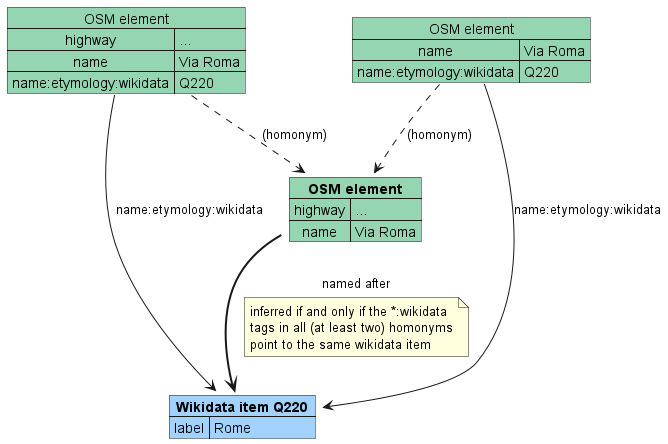
If you find an element that is linked to the wrong entity and you want to fix it or report the problem, check the linked entity's source row. If it includes the "etymology_details.propagation" step, check whether the bad link is caused by a wrong propagation. You can check the source of the copied link by clicking the first and last link in the source row, you will be taken respectively to the OSM page for the map feature and to the Wikidata page for the linked entity. If the linked entity was correct for the original OSM element but is wrong after being copied on the current feature, then this is the fault of the propagation and you should open an issue on OSM-Wikidata Map Feature's GitLab or GitHub projects. Otherwise the wrong link comes from the original source and you should fix/report it by following the steps above.
How to contribute to linked entities
Open Etymology Map gets entities linked to map features from OpenStreetMap and information about the linked entities from Wikidata. The following tools make it easier to contribute to OpenStreetMap by linking Wikidata entities:
- MapComplete helps discovering missing
*:wikidatatags and find their possible value - OSM ↔ Wikidata matcher helps discovering missing
wikidatatags and find their possible value - OWL map helps discovering missing
wikidatatags directly on a map - openstreetmap.org allows to manually edit map elements (you can learn how to map on the official welcome page and on LearnOSM)
The wikidata Q-ID of an item (object/person/...) can be found by searching its name on wikidata.org, once the subject will be opened its alphanumeric ID will be both on the right of the title and in the URL. Suppose for example that you want to link some item to Nelson Mandela: after searching it on wikidata you will find its page at https://www.wikidata.org/wiki/Q8023. As can be seen at the end of the URL, its Q-ID is Q8023.
| Platform | Property/Key | Links | Usage |
|---|---|---|---|
| OpenStreetMap | name:etymology:wikidata=* | OSM Wiki | Links the OSM element for the map feature directly to a Wikidata entity. Example: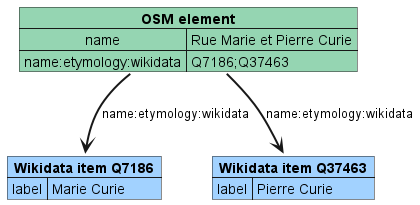 |
| OpenStreetMap | subject:wikidata=* | OSM Wiki | |
| OpenStreetMap | name:etymology=* | OSM Wiki | The value for this tag is used as title of a text-only linked entity |
| OpenStreetMap | name:etymology:description=* | OSM Wiki | The value for this tag is used as description of a text-only linked entity |
| Wikidata | P11693 (OpenStreetMap node ID) | Wikidata | The link is inferred by combining a OSM-Wikidata same-entity tag/property with an intra-Wikidata link property. Example: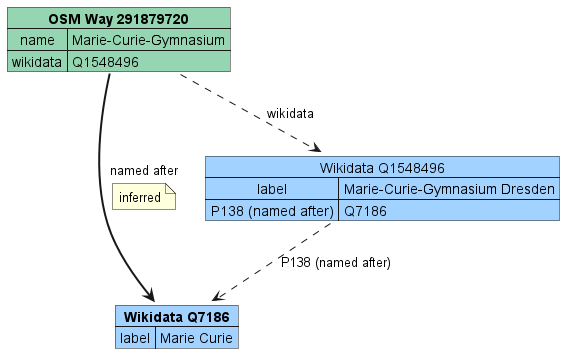 |
| Wikidata | P10689 (OpenStreetMap way ID) | Wikidata | |
| Wikidata | P402 (OpenStreetMap relation ID) | Wikidata | |
| OpenStreetMap | wikidata=* | OSM Wiki | |
| Wikidata | P138 | Wikidata | |
| Wikidata | P825 | Wikidata | |
| Wikidata | P547 | Wikidata |
In order to display an entity linked to a map feature you need to create one of these combinations. Here's how to do it:
- Find the element of interest on openstreetmap.org
- Check out the element's tags:
- If the element has a
name:etymology:wikidataorsubject:wikidatatag and this website's data has been updated since it has been added, then the element should already be available on the map. - If one of these tags is present and this website's data has been updated but the element isn't available on the map, then the tag value may contain an error (like not being a valid Wikidata ID).
- If one of these tags is available but links to the wrong entity, search on Wikidata the ID for the correct entity ID and edit the incorrect tag with the new ID.
- If the element has a
wikidatatag check the referenced Wikidata entity.- If it does not represent the same real world object of the OSM element, search the correct one and change it.
- If it contains a
P138,P825orP547relation check that it links to the correct entity. If it is absent, add it:- Click "+ Add statement"
- On the left choose the appropriate property among those above
- On the right search the desired entity to use as the value
- If none of these tags is present, you can link the Wikidata item for the entity directly to the map feature:
- Search the entity on Wikidata
- If the Wikidata entity for the subject you want to use is not available you can create it on https://www.wikidata.org/wiki/Special:NewItem using the instructions on that page.
- Add to the OpenStreetMap element the appropriate tag among those above with the Wikidata ID as value.Using the example above, if you want to state an element is named after Nelson Mandela you will need to add the tag
name:etymology:wikidata=Q8023.
- If the element has a
How to contribute to the background map
The background maps are provided by third-party providers:
Most of them render data from OpenStreetMap, which can be improved on openstreetmap.org. You can learn how to map on the official welcome page and on LearnOSM. Keep in mind that these external providers don't update the map immediately so if you edit something on OpenStreetMap it may take a lot of time to appear in the map.
Contributing to OSM-Wikidata Map Framework
See CONTRIBUTING.md.
Generated by OSM-Wikidata Map Framework 5.0.2 - Report an issue